
How to serve guests who don’t speak your language
Updated 31 October 2026
The short answer
Show a photo of every dish, keep the names and descriptions simple, and let guests read the menu on their own phone, where it can translate into their language. For allergies, always have a person confirm.
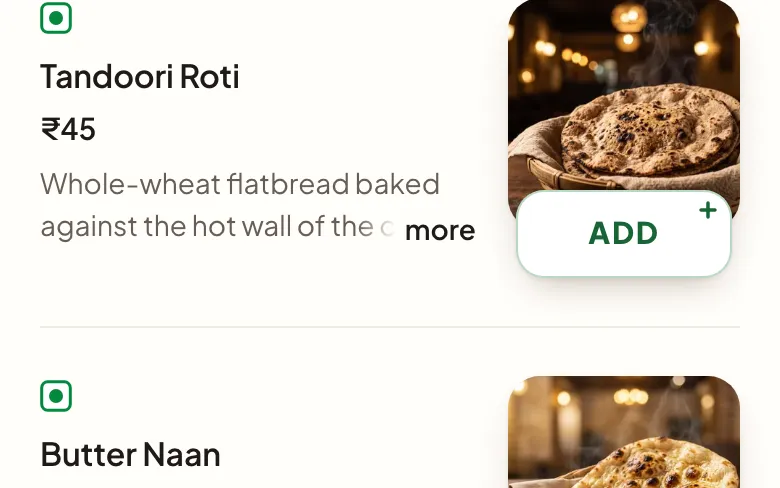
Photos do most of the work
A guest who cannot read the name can still point at the picture. Show every dish, and make sure the picture looks like what you actually serve, so nobody is surprised at the table.
Write so that translation works
Phone translation copes much better with simple words than with clever ones.
- Say what it is: “Grilled chicken with garlic and lemon”.
- Keep local names, then explain them in a few plain words.
- Mark vegetarian and spice levels clearly, using symbols wherever you can.
- Avoid jokes and wordplay in descriptions.
Let the guest’s phone translate
With a QR menu, the page opens in the guest’s own phone browser, and most browsers offer to translate it into the guest’s language. Dinebo’s guest menu is in English and works this way. Automatic translation is helpful but not perfect, so test your menu in two or three languages yourself.
Never leave allergies to a machine
A translated word can be wrong, and for someone with an allergy that matters. Train your staff to confirm ingredients in person, and tell guests clearly to ask before ordering. Follow your own country’s rules on allergen information.
Small things that help
- Teach staff to say hello and thank you in the languages you hear most.
- Show clearly how to pay and which payment methods you accept.
- Explain whether service charge is included, because the custom changes from country to country.
Try it yourself: open your menu on your phone and translate it into a language you do not read.
Try it free