
How to Share Your Restaurant Menu on WhatsApp
By Dinebo team · Published · 3 min read
The short answer
Send a link to your menu instead of a PDF or photos. Add that link to your WhatsApp Business profile, keep it ready as a quick message, and use broadcast lists and status when you have something new to share.
Why a link beats a PDF or photos
- A link stays right. A PDF sent last month still has last month’s prices.
- It doesn’t fill up your customer’s phone with files.
- It opens straight away, without zooming.
- You can change the menu without sending anything again.
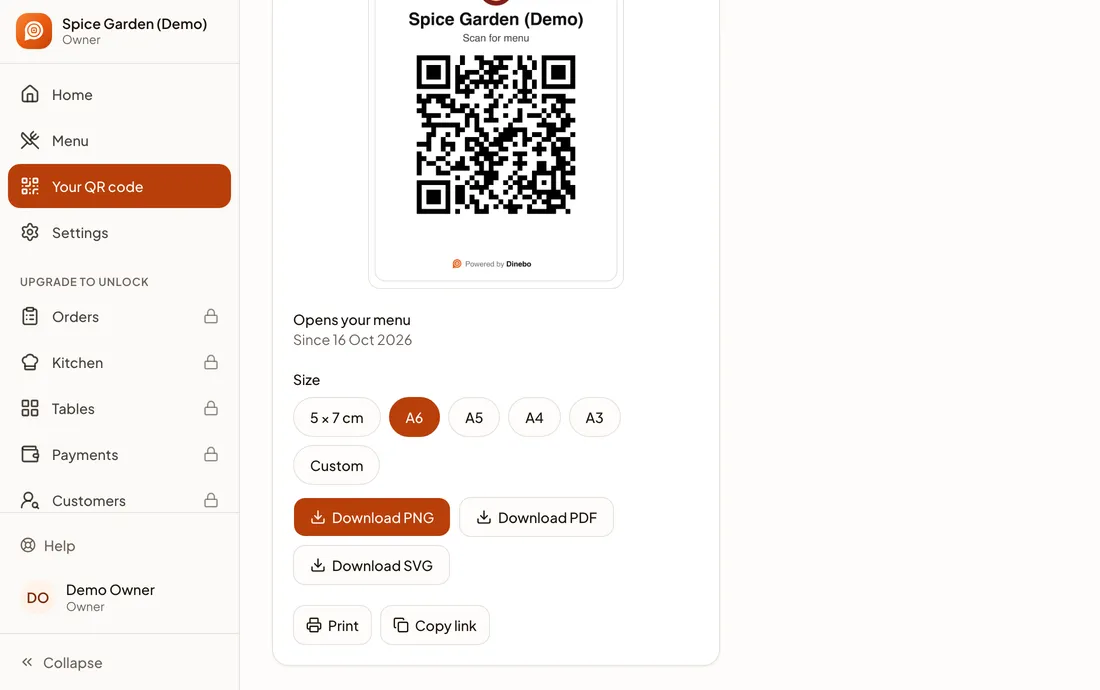
Get your link from your menu tool. In Dinebo, open Your QR code and tap Copy link. If you’re still using a PDF, here’s how to turn it into a digital menu.
Send it in a chat
When someone asks for your menu, paste the link with a short, friendly line. Here are some to adapt:
- “Hi! Here’s our menu, always up to date: [your link]. We’re open till 11 tonight.”
- “Thanks for asking! Our full menu with prices is here: [your link]. Tell us if you’d like to book a table.”
Keep your link somewhere easy to find, such as a pinned note or a quick reply in the WhatsApp Business app, so staff don’t have to hunt for it.
Add it to your WhatsApp Business profile
The WhatsApp Business app has a business profile with fields for your address, hours and website. Put your menu link in the website field if you don’t have a website, or include it in your profile description if you do.
People can then find your menu by tapping your business name, without having to ask you.
Tell regulars with a broadcast list
A broadcast list sends one message to many people, and each reply comes back to you as a private chat.
- Step 1: In WhatsApp, open Chats and tap the menu.
- Step 2: Tap Broadcast lists, then start a new list.
- Step 3: Choose your contacts and create the list.
WhatsApp’s rules are worth knowing:
- Only people who’ve saved your number will get the message. Ask customers to save it.
- Each list can hold up to 256 contacts.
- Lists don’t work on WhatsApp for Windows, Mac or Web.
- WhatsApp is rolling out monthly broadcast limits in some countries.
Only message people who’ve agreed to hear from you, and don’t do it too often. People who feel spammed can simply block you.
Share it on your status
Your status reaches people who have your number saved, and it’s a natural place for today’s special. Post a photo of the dish with your menu link in the text. Status updates disappear after 24 hours, so post again when you have something new.
Use a short link so people can find you
The WhatsApp Business app also creates a short link that opens a chat with you. Find it under Tools, then Short link. This does the opposite job: your menu link shows the food, and your short link starts a conversation.
Put both together. On your Instagram profile or website, use one button for “See the menu” and one for “Message us”.
Should you use the WhatsApp catalog?
The WhatsApp Business catalog lets you add items with photos and prices. It can work for a small range, such as a few set meals or cakes, but it has limits as a full menu:
- You add each item by hand.
- WhatsApp reviews each item before customers can see it.
- It’s one more place to update when your prices change.
For most restaurants, a link to one menu is simpler. Use the catalog only for your few best sellers, if at all.
Official pages we checked
- WhatsApp: How to use broadcast lists
- WhatsApp: How to create short links
- WhatsApp: How to create and maintain a catalog
These apps change their screens often. If a step looks different, their own page has the latest. Last checked 1 November 2026.